


15th Club Golf GPS Rangefinder
3.6178.00 Reviews
App Specs
- Version
- 4.4.2
- Updated On
- License
- Free
- Downloads
- 50,000+
- Developer
- Advantage Golf GPS Technology
- Categories
- Sports
- Platform
- Android
Screenshots
 Analysis by AppCompare
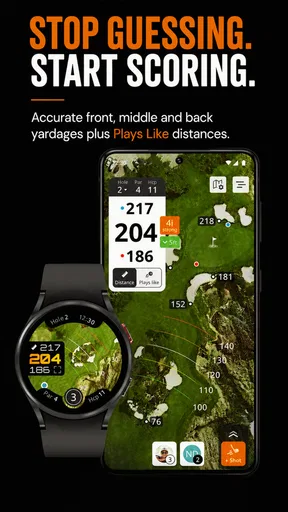
When I use a golf app during a round, I want one thing above all: a distance answer that arrives quickly enough to influence the shot I am about to play. 15th Club Golf GPS Rangefinder is built around that need. It is a free sports app from Advantage Golf GPS Technology that combines GPS distances with a scorecard, shot tracking, and course maps, but the rangefinder is the feature that gives the whole experience its purpose.
That focus makes it more interesting than a simple digital scorecard and less demanding than carrying a dedicated golf device. I found the appeal easy to understand: instead of estimating from markers or walking to a sprinkler head, I can check the app and make a more informed club decision. The result is not magic, and it does not remove the judgement involved in choosing a shot. What it does is reduce one common source of uncertainty.
The app is available at no charge, with optional in-app purchases ranging from $4.99 to $79.99 per item. It is rated for Everyone, so its basic audience is broad, from casual players to regular golfers who want course information on a phone. Its average rating is 3.6 from 821 ratings, while 178 written reviews give a useful reminder that this is a practical tool with some room for improvement rather than a universally perfect companion.
Why the GPS rangefinder matters more than the extra tools
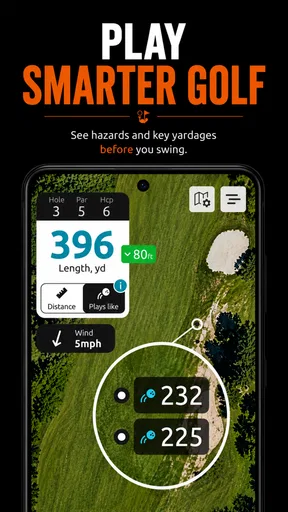
The strongest idea in 15th Club is the conversion of a course into a set of more manageable decisions. On the tee, I can use the course map and distance information to think beyond “How far is the hole?” I can consider where I want the ball to finish, whether a conservative line makes sense, and which club gives me a realistic chance of reaching the target without forcing a risky swing.
That is the real effect of a GPS rangefinder. It does not improve contact, correct a slice, or tell me exactly how the ball will react. It gives me a reliable starting point for the decision. For a golfer who often chooses a club by feel alone, that small amount of structure can make a round calmer. For an experienced player who already knows every yardage on a familiar course, the benefit is smaller, but the map and shot-tracking tools may still make the app worthwhile.
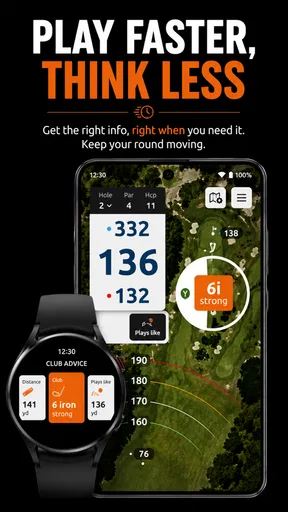
I also like that the rangefinder sits alongside a scorecard instead of existing as an isolated measuring tool. After checking a distance, I can record the result of the hole in the same general workflow. That matters because switching between separate apps, a paper card, and a rangefinder can make a round feel more complicated than it needs to be. The more naturally the distance check fits into the round, the more likely I am to use it consistently.
What the course map adds to a distance reading
A number by itself can be misleading. If I see a distance to the green but do not understand the shape of the hole, I may still choose poorly. The course-map element gives the rangefinder context. It helps me think about the hole as a layout rather than a single target, which is especially useful when the direct line is not the smartest line.
Worth Reading Before You Choose

Flipboard Shows What News Apps Must Do Beyond the Feed

Switching to Android Auto Means Rethinking Your Driving Routine

Google Calendar Makes a Crowded Week Easier to Manage

Ludo King Makes the Most of the Minutes Between Plans

Baby Panda World Brings Quick Play to Modern Phones, but Its Game Library Feels Busy

ESPN’s Live Game View Makes Following Close Games Easier
This is where the app can be more useful than relying only on marked yardages. A marker might tell me how far I am from a fixed point, while the map encourages me to consider the next shot and the space around it. I can use that information to decide whether to aim for a safer part of the fairway, lay up, or attack a green. The app does not make that decision for me, and I prefer that. It supports course management without pretending to replace it.
One practical habit is to check the map before I hit, not only after a poor shot. Looking at the hole early gives me time to choose a target and commit to it. Checking the rangefinder only when I am already standing over the ball can turn useful information into last-second hesitation. Used as a planning tool, the app has a larger effect on the round than when it is treated as a simple emergency yardage reader.
Shot tracking is most useful as a learning tool
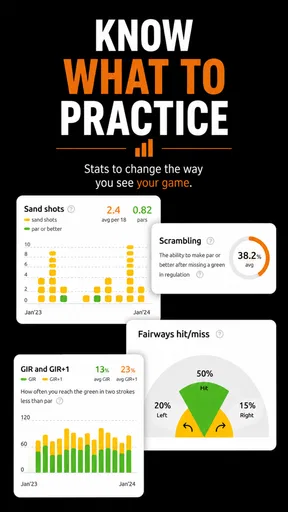
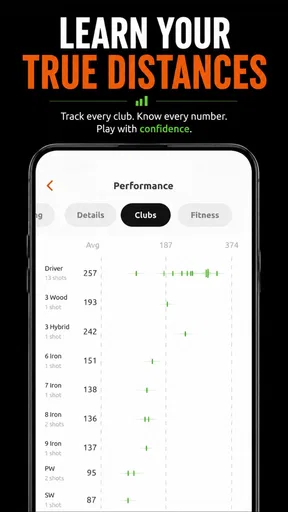
The shot-tracking function is easy to overlook because the GPS distance feels more immediately valuable. In my view, tracking becomes useful when I stop expecting it to provide instant coaching and instead use it to notice patterns. Recording shots can help me compare what I intended to do with what actually happened, particularly when I am trying to understand whether poor scores come from club selection, direction, or repeated decisions around hazards.
There is a trade-off here. Tracking every shot demands attention, and some golfers will not want to interact with a phone throughout a social round. I would not recommend turning the app into a constant data-entry task. A better approach is selective tracking: use it during practice rounds, on holes where course management is difficult, or when testing a change in strategy. That keeps the information useful without allowing the app to interrupt the rhythm of play.
This is one of the less obvious ways to get value from the app. The rangefinder helps with the current shot; shot tracking can help with future decisions. Those are different jobs. Treating them separately makes the experience more manageable and avoids the common mistake of collecting information without knowing how it will change the next round.
How I would use it during an actual round
Imagine arriving at a course I do not know well for a weekend round. Before teeing off, I would open the relevant course view and use the map to understand the general shape of the opening hole. Rather than immediately reaching for a driver, I would look at the available landing area and choose a target that matches my usual dispersion. Once the ball is in play, I would use the rangefinder to establish the distance for the next shot and then combine that with the lie, wind, elevation, and the position I want to leave for the following shot.
That last part is important: GPS distance is one input, not the complete answer. A distance that looks comfortable on screen may require a different club if the ball is sitting in rough or if the green is guarded. I would rather use the app to remove guesswork about location and then make the rest of the decision myself. This keeps the technology helpful instead of letting it create false confidence.
On a par three, the workflow is even simpler. I can check the distance, study the map, choose a conservative target if the hazards make the pin too aggressive, and put the phone away before swinging. On a longer hole, the map has more strategic value because it can influence the tee shot and the lay-up decision, not just the approach.
For scoring, I would update the scorecard at a natural pause, such as after leaving the green or before moving to the next tee. Entering information immediately after every stroke may be accurate, but it can also distract me from the group and the pace of play. The app works best when it supports the round quietly rather than demanding to become the center of it.
A useful routine for unfamiliar courses
My preferred routine would be to preview the next hole while walking away from the previous green, identify a broad target, and then use the rangefinder only when the shot requires a precise decision. This reduces screen time and helps prevent the phone from becoming a source of indecision. It also gives me a chance to think about the hole before standing over the ball.
For a first visit to a course, I would pay special attention to how the map changes my choice of target. The biggest gain is not always hitting a club closer to the hole. Sometimes the better result is avoiding a side of the fairway that leaves an awkward angle, or choosing a shorter club because the next shot becomes easier. That kind of course management is where a map-based rangefinder can outperform a basic distance-only tool.
Another worthwhile workflow is to use the app during a practice round without trying to maximize the score. I can track selected shots, note which club I chose, and see whether my decisions were sensible even when execution was poor. A mishit does not automatically mean the strategy was wrong. Separating decision quality from swing quality is a useful way to learn, and the app’s combination of distances, maps, and tracking supports that reflection.
Where the experience becomes less convenient
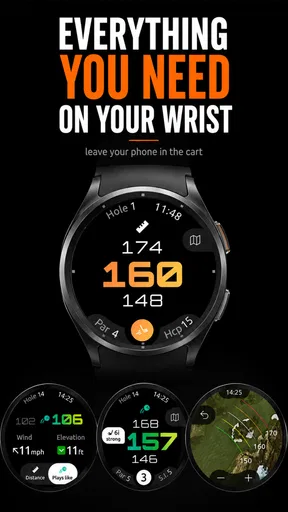
The phone-based format has obvious friction. I need to keep the device accessible, make sure it has enough battery for the round, and accept that a bright screen can be less comfortable outdoors than a dedicated golf watch or handheld unit. Even when the app is functioning well, pulling out a phone takes more effort than glancing at a device already attached to my wrist.
That does not make 15th Club a poor choice, but it changes who should use it. Golfers who dislike carrying a phone on the course or who want instant information without touching anything may be happier with dedicated hardware. A phone app is more attractive to someone who already brings a phone, wants multiple tools in one place, and does not mind checking the screen between shots.
GPS information also deserves sensible expectations. Distance readings can guide a decision, but they cannot account perfectly for every playing condition. Wind, lie, temperature, slope, and the golfer’s own strike quality still matter. I would never use the app as a reason to ignore a visible hazard or choose a club that does not match my normal carry. The rangefinder is most valuable when it narrows uncertainty, not when it encourages overconfidence.
The free entry point is another reason to try it, but optional purchases should be considered carefully. The listed range of $4.99 to $79.99 per item is wide, so I would look closely at what an upgrade provides before paying. A casual golfer who plays only occasionally may get enough from the no-cost experience, while a frequent player may find a paid option easier to justify if it improves the specific parts of the app they use every round.
The rating also suggests a balanced attitude is sensible. A 3.6 average is respectable but not a signal that every golfer will have a seamless experience. I would test the app on a familiar course before depending on it for an important competition or an unfamiliar layout. That trial lets me learn the interface, see how quickly I can access distances, and decide whether the phone workflow suits me.
When another option is the better fit
A traditional paper scorecard remains better for a relaxed round where I want to avoid screens completely. It is faster for recording a score and never competes with conversation or battery life. A dedicated GPS watch is a stronger choice for golfers who want glanceable distances and minimal interaction. A laser rangefinder can be preferable when I want to lock onto a specific flag or object rather than consult a mapped course view.
Those alternatives do not make 15th Club unnecessary. They simply emphasize different priorities. The app’s advantage is breadth: distance information, course maps, scoring, and shot tracking are gathered around the phone I already carry. If I value that combination more than the convenience of specialized hardware, the compromise makes sense. If I want the fastest possible measurement with no phone handling, it probably does not.
Who is likely to gain the most
I think the best audience is the golfer who is moving beyond casual guessing but is not ready to buy dedicated equipment. A beginner can use the distance information to develop a more repeatable club-selection routine, while an improving intermediate player can use maps and selective shot tracking to make better strategic choices. The free starting point lowers the barrier to experimenting with that approach.
It is also a good match for players who visit different courses. Familiarity naturally supplies some of the information a GPS app provides, but an unfamiliar layout creates more opportunities for the map to help. Before a first round somewhere new, I would use the app to understand where conservative targets might be and then rely on the rangefinder during play to confirm the decisions that matter most.
Regular golfers who enjoy reviewing their rounds may get additional value from the scorecard and shot-tracking combination. The important qualification is that tracking should serve a question. For example, I might want to know whether I lose more strokes by missing greens short or by choosing aggressive lines from the tee. Without a question like that, recording everything can become work with little payoff.
I would be less enthusiastic about recommending it to someone who already owns a dependable GPS watch, prefers a laser, or wants a completely screen-free round. I would also hesitate if the golfer expects the app to provide automatic swing advice or remove the need to judge conditions. Its strengths are practical and specific: it places course information beside the scorecard and makes distance-based planning easier.
My final take on the rangefinder-first design
After looking at the app as a playing companion rather than a collection of menu items, I see a clear purpose. The GPS rangefinder can turn a vague approach into a deliberate one, while the course map adds strategic context and the scorecard keeps the round organized. Shot tracking extends the value beyond the current hole when I use it selectively and with a learning goal.
There is still a price to that convenience. I have to manage a phone, accept the limits of GPS-based information, and decide whether optional purchases are worthwhile for my style of play. Those are real compromises, especially for golfers who already own dedicated equipment. The app is not automatically better than a watch, laser, or paper card; it is better when its combination of tools matches the way I play.
For me, the most convincing reason to try it is not the promise of lower scores. It is the chance to make fewer uninformed decisions. If I use the map before the shot, check the distance without overthinking it, and treat tracking as occasional feedback rather than constant homework, 15th Club Golf GPS Rangefinder becomes a sensible companion for everyday rounds. With a current version of 4.4.2 and over 50K installs, it has already found a meaningful audience, and I can see why: its best contribution is making course management more deliberate without requiring a separate golf device.
Pros
- Accurate GPS distances for fairways
- greens
- hazards
- and layup points.
- Includes score tracking and statistics to monitor progress over time.
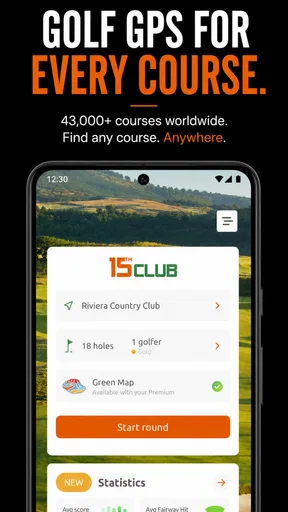
- Works on many courses worldwide without requiring a physical rangefinder.
- Simple interface makes it quick to check distances during a round.
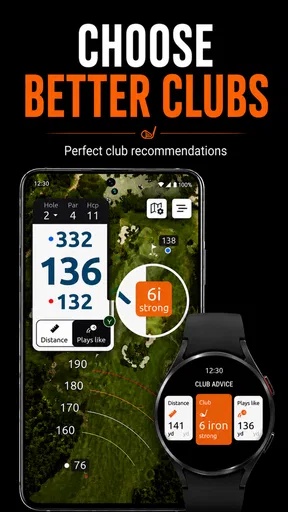
- Can help improve club selection and course-management decisions.
Cons
- Course coverage and map quality may vary by location.
- Some advanced features may require a paid subscription.
- GPS use can noticeably reduce battery life during long rounds.
- Requires a clear view of the sky for the most reliable positioning.
- Limited value for golfers who mainly play unfamiliar or unmapped courses.
FAQs for 15th Club Golf GPS Rangefinder
What is 15th Club Golf GPS Rangefinder, and what does it do?
15th Club Golf GPS Rangefinder is designed to help golfers make better on-course decisions by providing GPS-based distance information. It can display yardages to relevant points on the hole, such as the front, middle, and back of the green, and may include additional course information depending on the available data. It is intended as a practical alternative to carrying a separate handheld rangefinder.
Does 15th Club Golf GPS Rangefinder work without an internet connection?
The app may require an internet connection to download courses, update course information, sign in, or access certain online features. After a course has been downloaded or cached, some GPS distance functions may continue to work with limited or no mobile data, although this can vary by device and app version. It is best to open the app before playing and confirm that your selected course is available offline.
How accurate are the distances shown by the app?
Distance accuracy depends on the quality of the app’s course database, GPS reception, your phone’s location settings, and your position on the course. In normal outdoor conditions, the measurements should be useful for club selection and general strategy, but they should not be treated as a guaranteed replacement for a professional laser rangefinder. Trees, buildings, weak signals, and outdated mapping can affect results.
Is 15th Club Golf GPS Rangefinder free to use, or does it require a subscription?
The availability of free features, paid upgrades, and subscription options can depend on the current version of 15th Club Golf GPS Rangefinder and the platform where it is downloaded. Some basic GPS functions may be accessible without payment, while advanced tools, expanded course coverage, or additional statistics may require an in-app purchase. Check the app-store listing before downloading for the latest pricing details.
What permissions and phone features does the app need while I am playing?
The app normally needs access to your device’s location so it can calculate your position and provide distances on the course. It may also use mobile data or Wi-Fi for course downloads, updates, account features, and synchronization. GPS use can consume more battery than ordinary apps, so starting with a full charge and carrying a portable charger is advisable, especially during a full 18-hole round.


